Build robust Business Central APIs in minutes, not days
API Extender turns Microsoft Dynamics 365 Business Central data into secure, consistent, high‑performance APIs. Select tables, shape data, publish endpoints—then deploy confidently with built‑in security and observability.
than hand-writing API code
with automatic API definition code generation
with versioning, and source code control integration
than one developer, 3 days a year
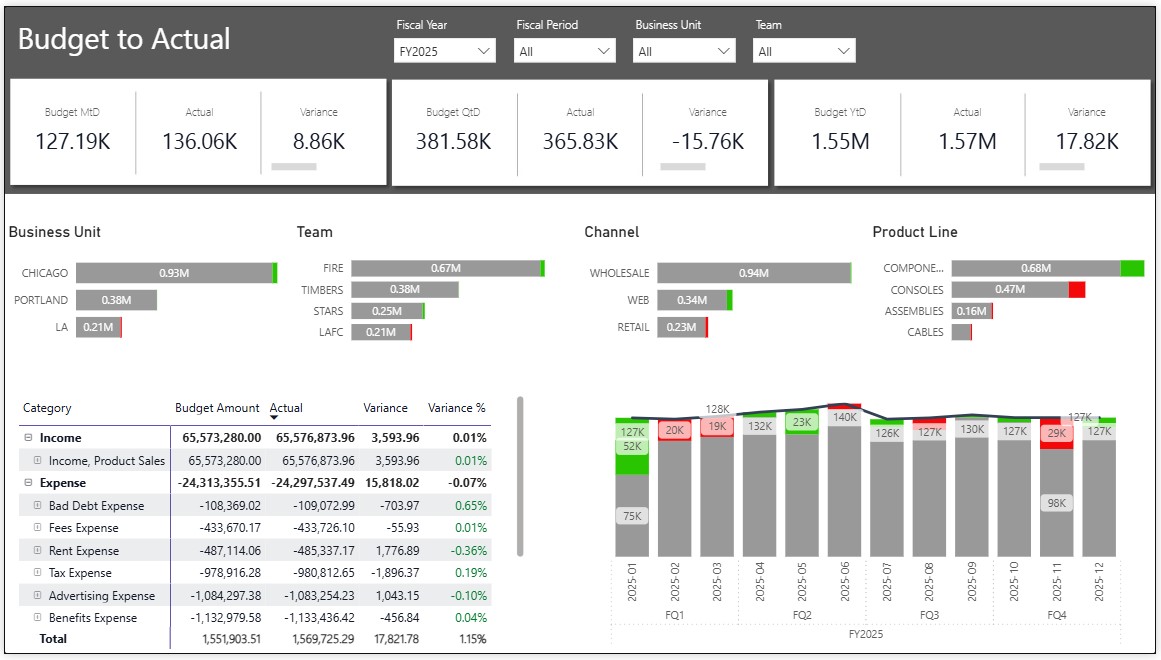
Power BI Dashboards for Microsoft Dynamics 365 Business Central.
Ready to run Power BI dashboards with business ready analytics and key performance indicators
- Power BI Dashboards include ready-to-run financials, with budgets, account categories and dimensions.
- Set up in minutes using API Extender configuration tool.
- Designed for, and extensible by, accountants, managers, and executives.
API Extender makes connecting to data the first time, as quick & painless as possible.
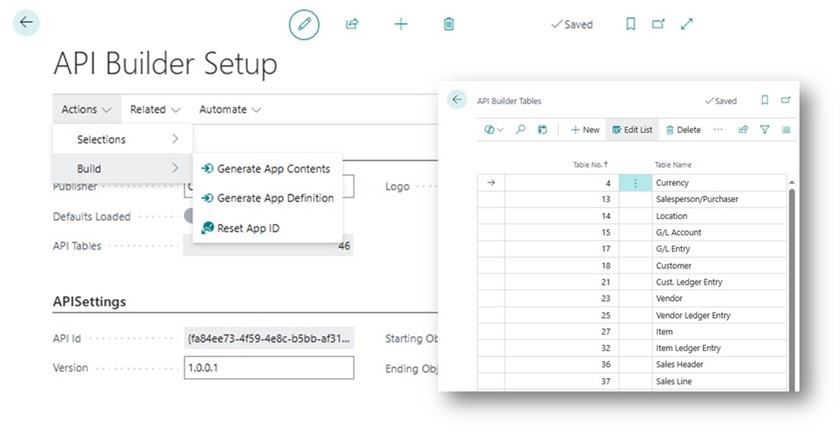
Expose exactly the data you want to include with your Microsoft Dynamics 365 Business Central connector.
- Standard Microsoft Dynamics 365 Business Central application language (.AL) extension
- Configuration tool to publish an organizational API containing selected tables and fields.
- Designed to integrate with Power BI Dashboards, Power Platform, and Azure.
- Can be installed and activated by your admin in about 15 minutes.
Start analysis in 15 minutes
Pre-built Power BI dashboards connect immediately to API's designed by the API Extender app.
- Power BI Dashboards include ready-to-run financials, with budgets, account categories and dimensions
- API Extender makes connecting to data the first time, as quick & painless as possible.
- Designed for, and extensible by, accountants, managers, and executives.
Ready to run financial dashboard suite
Hand-crafted semantic models, KPIs and time intelligence built for financial professionals
From table to production endpoint—fast
Pick the Business Central tables you need, select fields, and publish REST endpoints that are stable and scalable. No brittle scripts, no manual docs.
Why teams choose API Extender
Speed
Cut delivery time with a guided builder and one-click deployment.
Security
Hardened defaults, role-based access, OAuth 2.0 encrypted.
Stability
Production‑ready endpoints with typed data and schema versioning.